Tuesday, 22 November 2016

The Golden Ratio

Geometry has two great treasures: one is the theorem of Pythagoras; the other, the division of a line into extreme and mean ratio. The first we may compare to a measure of Gold; the second we may name a Precious jewel. – Kepler (1571- 1630)


In everyday life, we use the word “proportion” either for the comparative relation between parts of things with respect to size or quantity or when we want to describe a harmonious relationship between different parts. In mathematics, the term “proportion” is used to describe an equality of the type: nine is to three as six is to two. The Golden Ratio provides us with an intriguing mingling, it is claimed to have pleasingly harmonious qualities.

The first clear definition of what has later become known as the Golden Ratio was given around 300 B.C by the founder of geometry as a formalized deductive system , Euclid of Alexandria.

  
In Euclid’s words:

A straight line is said to have been cut in extreme and mean ratio when, as the whole line is to the greater segment, so is the greater to the lesser.
If the ratio of the length AC to that of CB is the same as the ratio of AB to AC, then the line has been cut in extreme and mean ratio, or in a Golden Ratio.

The Golden Ratio is thus the ratio of the larger sub-segment to the smaller. If the whole segment has length 1 and the larger sub-segment has length x (Figure 2), then

Sunday, 20 November 2016

Why C Should be your First Programming Language ?


This is was the same question I asked myself when I started writing my first program. I tried many languages but finally I came to C, the most beautiful and charming language of all. I was literally blown away by the simplicity and elegance of C. 

Though C is simple it is one of the most powerful languages ever created.

In this dynamic IT world new language comes every day and get obsolete, so there must be something in the C which has remained there for 3 decades and more and even today there is hardly any language which can match its strength.

90% of the starting programmer says that C has been superseded by its predecessors such as C++, Java, and C # and so on so why learn C. I don't know why they think so but I know one thing that they will never excel the other 10% programmers who differ from this opinion. Simple reason is how could a skyscraper building stand against time if its foundation is not strong. 

C was the programming language developed at AT & T's Bell Laboratories of USA,in 1972. It was written by a man name Dennis Ritchie.

Now Let us begin to analyze reason, why C should be your first programming language.

1.I believe nobody can learn C++ or Java directly. To master these languages you need to have a strong concept of programming element such as polymorphism, classes, inheritance etc. Simple question is how you can learn such complicated concepts when you don't even know about the basic elements such as block functions. C is a language which begins from scratch and it has foundational concepts on which today concepts stand on.

2.It is language on which C++ is based on, hence C# also derive its origin from the C. Java is also a distant cousin of C and share the same programming concept and syntax of C. These are the most dominant languages in the world and all are based on C. To rock the world through them you must get rocking with C.

3.C++, Java, and C # make use of OOP (Object Oriented Programming). Not all programs need it even though it is a powerful tool. Such programs are still written in C.

4. Where ever it comes to performance (speed of execution), C is unbeatable.

5.Major parts of the Windows, Unix and Linux are still written in C. So if you  program these OS or create your own you need to know C.

6.Device drivers of new devices are always written in C. The reason is that C provides you access to the basic elements of the computer. It gives you direct access to memory of your CPU through pointers. It allows you to manipulate and play with bits and bytes.

7.Mobiles, Palmtops, PDA's etc are gaining popularity every second. Also appliances such as T.V., Refrigerators, and Microwaves etc. are becoming an integral part of our daily needs. You may not know but they have a CPU with them which do need programming and the software's written for them are known as embedded system programs. These programs have to be fast in execution but also have a very little memory. No question why C is ideally suited for embedded system programming.

8.You must have played games on your PC. Even today these astounding 3D games use C as their core. Why? The simple reason who will play the game when it takes a lot of time fire a bullet after you have given command from the console. The reply to the command should be damn prompt and fast. Reply in 1 Nano second is an outstanding game; Reply in 10 Nano seconds is crap. Even today there is no match for C.

9. C is a middle-level language. There are three types of language - High Level, Middle Level & Low Level. High-level languages are user oriented, giving faster development of programs, example is BASIC. Low-level languages are machine oriented; they provide faster execution of programs. C is a middle-level language because it combines the best part of high-level language with low-level language. It is both user and machine oriented and provides infinite possibilities.

10.Last but not least it is a block structured language. The first symbol of a modern language is that it is block structured. Each code exists in separate block and is not known to code in other block providing easy means of programming and minimizing the possibilities of undesirable side effects. C is designed from the base to top to be a block structured language. Many older languages, most popular being BASIC tried to introduce this concept but their short coming can never fulfilled as they were never built along those line. 

I think I have given all reason I know why c should be your first programming language. One thing is for sure that there no other language which more reliable, simple and easy to use.

Saturday, 19 November 2016

PageRank - Google's Algorithm ( The heart of google )

What is it?

PageRank is an algorithm used primarily for rating the popularity of web pages. Although one may initially think 'Page' refers to the web page, it actually refers to the inventor, Larry Page (a founder of Google). This is why you'll find the capital 'P' wherever you find a reference to the algorithm.
The basic assumption is that the more inbound links a web page has across the web, the more valid the content the page contains. It's a crowd-sourcing algorithm of sorts; it relies on everybody online to create a network of links to different web pages and classifies the validity of each page based on its overall popularity.

Applications

The most obvious application of PageRank is the Google search engine. In fact, much of the company's initial success may be attributed to the effectiveness of PageRank in organizing search results on Google.
It is important to note, however, that it is not only web pages which may use PageRank. Any data which can be modeled as a directional graph can be analyzed with PageRank.

The Math

Consider a directional graph, where web pages are modeled as nodes, and the links are modeled as vertices. Each vertex represents a link from one page to another.
While it may be tempting to simply count the total number of links pointing to each web page to discover which page is the most popular, PageRank is a bit more sophisticated.
We begin by assigning each node a score between zero and one. This score represents a probability distribution. If you are unfamiliar with probability distributions, don't worry. This example will make sense regardless.
The initial score is:
PR(N) = 1/n
This reads as "The PageRank of each node is one divided by the total number of nodes in the network." Each node starts with the same initial score.
Let's use an example network with five nodes: A, B, C, D, and E. In this case, each node has an initial score of 0.2. Now imagine a link:
A -> C
This would transfer all of A's scores to C, leaving A with 0 and C with 0.4.
Imagine A with two outbound links:
A -> C
A -> D
In this case, A would still have 0, but C and D would split the 0.2 from A. This leaves D with 0.3 and C with 0.3.
Be aware that this is an example of a simple Page Rank algorithm. More advanced implementations will use tools such as a damping factor.

Input Description

This is a simple implementation of the PageRank algorithm. It accepts an input in the form of an int[][] or a String which can define the d value and the number of loops. The default d value is 0.85, and the default number of loops is 20

page 0 links to pages 1,2,3
Page 1 links to page 0
Page 2 links to page 0
Page 3 links to pages 0,4,5,6,7
page 4 has no links
page 5 has no links
page 6 has no links
page 7 has no links

Sample Input

[[1,2,3],[0],[0],[0,4,5,6,7],[],[],[],[]]

Sample Output


[0.9142543787391981,0.4089334112608257,0.4089334112608257,0.4089334112608257,0.21947767079447258,0.21947767079447258,0.21947767079447258,0.21947767079447258]

Thursday, 17 November 2016

The Instagram Feed's Algorithm

Of the three social networks in this post, Instagram is the newest to an algorithm-run feed. Although Facebook acquired Instagram in 2012, it didn't fiddle with catering content to specific users until April 2014, when they tweaked the "Explore" tab to display posts specifically tailored to each user. Before that change, the "Explore" tab had only showed the most popular posts across all Instagram users instead of specific users.
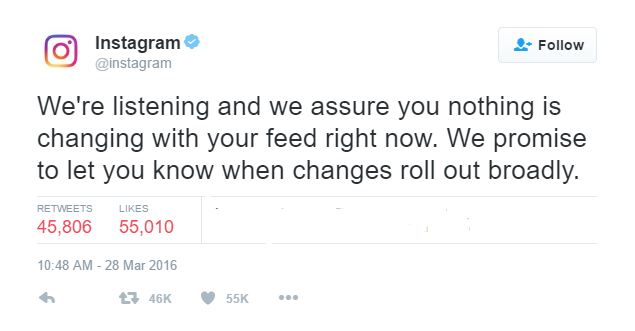
Even more recently, there have been rumblings about an impending change to Instagram's algorithm that'll alter your Instagram feed pretty drastically. A post to Instagram's official blog on March 15, 2016 said, "To improve your experience, your feed will soon be ordered to show the moments we believe you will care about the most."
As with Facebook, the goal of this change is to improve user experience. After all, Instagram reports that people miss 70% of the content on their Instagram feeds on average.

How It'll Work

The folks at Instagram say they want to focus first on optimizing order. In other words, all the posts will still be there, just in a different order. The algorithm will likely order the content on your feed based on the following factors:

1) The number of Likes and comments a post has.

An Instagram spokesman told Tech Insider that it won't be a popularity contest. That being said, the number of Likes and comments a post gets will be given some weight.

2) Your relationships with the user posting.

If you tend to Like photos from certain accounts, or regularly leave comments on pictures from those accounts, then Instagram will likely show you more posts from them.

3) The timeliness of the post.

To maintain some emphasis on chronology, the time at which the photo was posted will have some determination of where it shows up in your feed so you're seeing timely posts.

4) What you share directly with users (and who those users are).

What posts you share directly with other users -- and who those users are -- will make it more likely that you'll see posts from those users in your feed.

When Will These Changes Roll Out?

How soon are we talking, here? According to Instagram's blog post on March 15, 2016, the change will roll out to users over the next few months.

Again, it's likely that the first sign of a change will be a change in the chronology of posts, so keep an eye out for that as you scroll through Instagram over the next few months.

Twitter's Timeline Algorithm


Whereas Facebook makes most of the decisions for you on what will show up on your Facebook News Feed, Twitter's historically taken a very different approach with what they call the "Timeline."
Your Timeline is the stream of tweets from the users you follow that shows up on your account homepage when you first log in. It used to be that your Timeline was made up of every single tweet from every user you follow, in chronological order. But the folks at Twitter found that, similarly to what was happening on Facebook, users felt like they were missing all the best tweets from the people they care about most.
"We wanted to change that feeling of missing out," said Twitter Product Manager Michelle Haq, "which is why we decided to go after that problem."
The changes they made to the algorithm aren't nearly as platform-changing as the one Facebook has made, but it is a departure from the real-time element that has defined Twitter from the beginning.

How It Works


The engineers at Twitter have attempted two different approaches for surfacing the "best" tweets first on your Timeline: the "While You Were Away" feature and the even newer "Show me the best Tweets first" feature.

The "While You Were Away" Feature

This feature was added in 2015 as a first attempt to rid users of whatever FOMO (fear of missing out) they may have been feeling from the chronological nature of the original Timeline. 
Basically, it's a recap of some of the best tweets you may not have seen otherwise. How do these tweets make the cut? According to TechCrunch, it's determined by "user engagement" -- although they don't get any more specific than that.
You can't turn off the feature, but how often you see it depends on how often you use Twitter. The recaps pop up more frequently for users who check the app "only once in a while," according to Twitter Product Manager Paul Rosania in the official announcement.
"Our goal is to help you keep up -- or catch up -- with your world, no matter how much time you spend on Twitter," wrote Rosania. "With a few improvements to the home timeline,we think we can do a better job of delivering on that promise without compromising the real-time nature of Twitter." 

The "Show Me the Best Tweets First" Feature

The "Show me the best Tweets first" feature, introduced in February 2016, is a little more similar to Facebook's News Feed. Why? Because it actually changes the content on your Timeline based on a tweet's relevancy, rather than listing tweets chronologically.
By default, Twitter's algorithm puts the tweets it thinks you'll find most interesting at the top of your Timeline, still recent and in reverse chronological order. These tweets are chosen based on accounts you interact with most, tweets you engage with, and much more, according to Twitter's Support page.
The rest of the tweets will be displayed right underneath, also in reverse chronological order. Unlike the "While you were away" feature, these "best tweets" won't be highlighted or indicated in any way -- so you won't be able to tell where the "best tweets" stop and the rest of the tweets begin. According to Wired, while there’s no limit to how many "best tweets" will be out of order at the top, Haq says the average is about a dozen.
There are two ways to remove these "best tweets" from the top of your Timeline. One is a quick fix: You can always refresh your Timeline to see all new tweets at the top in the totally live way you might have been used to seeing in the past.
But if you want to always see your Timeline live, then Twitter does allow you to opt of this feature if you'd like -- unlike Facebook's News Feed.
To opt out of this feature: Go to your profile settings. In the "Account" tab, scroll down to "Content" and look for "Timeline." Toggle the box next to "Show me the best Tweets first" to change the setting.
 twitter-show-best-tweets-first.png

Facebook's News Feed Algorithm

“Our goal is to build the perfect personalized newspaper for every person in the world,” Facebook CEO Mark Zuckerberg said in a public Q&A in 2014. “We’re trying to personalize it and show you the stuff that’s going to be most interesting to you.”
That's what Facebook's News Feed has been about since the very beginning. According to Zuckerberg, each of us gets exposed to more than 1,500 stories each day, but an average user only gets to see about 100 stories a day on their News Feed.
To give these users the best experience possible, Zuckerberg and his team of engineers are constantly learning user behavior and picking up signals that show what kind of content each user is most interested in.

How It Works

The Like button has always been the epicenter of Facebook's user experience -- not only because we see it on everyone's posts, but also because it allows us to personalize our own experience (and influence everyone else's). Since it was first introduced in November 2007, it's helped Facebook's engineers figure out which posts were delighting users, boring them, offending them, and so on.
Nowadays, the algorithm that governs Facebook's News Feed has grown to be much more sophisticated. It isn't just about the Like button anymore -- and not just because reaction buttons are now in the mix. In fact, Facebook's algorithm is by far the most complicated of the three social networks covered in this post.
Here's a quick rundown of the most important things Facebook's algorithm takes into account.

Relevancy Score

When picking posts for each person who logs on to Facebook, the News Feed algorithm takes into account literally hundreds of variables -- and can predict whether a given user will Like, click, comment, share, hide, or even mark a post as spam.
More specifically, the algorithm predicts each of these outcomes with a certain degree of confidence. This prediction is quantified into a single number called a "relevancy score" that's specific both to you and to that post.
Once every post that could potentially show up in your feed has been assigned a relevancy score, Facebook's sorting algorithm ranks them and puts them in the order they end up appearing in your feed. This means that every time you log in, the post you see at the very top of your News Feed was chosen over thousands of others as the one most likely to make you react and engage.
Ads are given relevancy scores, too, so that Facebook can show users only the ads that could matter most to them. Again, this is supposed to give users a better experience -- but it's also helpful for the businesses that are paying for the ads. It's calculated based on the positive feedback (video views, conversions, etc.) and negative feedback Facebook expects an ad to receive from its target audience. (Learn more about relevancy score for Facebook ads here.)

Prioritizing Friends

Before 2015, Facebook was predicting what users want to see on the News Feed based on more indirect signals, like Likes, comments, and shares of others. Eventually, they added options for users to filter out posts they don't want to see. But what about helping boost the posts users do want to see?
Through studies and surveys, they found that many users were concerned they were missing important updates from friends they cared about the most. In response to these concerns, they began changing the News Feed algorithm to give more control to the users themselves.
It started in April 2015, when they began giving priority (in the form of higher relevancy scores) to posts from friends over the Pages they follow and promotional posts. Later that year, in July, they introduced the "See First" feature, which lets you actually hand-pick which accounts -- whether friends or followed Pages -- you want to see first at the top of your News Feed.
Now, when you select a person or page to "see first," their posts will appear at the top of your News Feed. (Note: Selecting people to "see first" is different than selecting them as a close friend: When you select a person as a close friend, you'll just receive notifications when they post something new.)
To select people or pages to "see first": First, click the downward facing arrow in the top-right corner of any Facebook page and select "News Feed Preferences."

In the window that appears, click "Prioritize who to see first." Then, select the people or pages you'd like to, see first on your feed.


Time Spent on a Post

Starting in June 2015, Facebook started monitoring how much time users spend viewing certain posts. Of course, the time you spend on a post can vary depending on your internet speed, the length of the post, and so on -- and the folks at Facebook are aware of that.
However, they have found that if people are spending a lot more time on a particular post in their feed than the majority of other posts they look at, then it's a good sign the content was relevant to them.
How does this play out in the feed? If you spend more time on a particular post, Facebook is more likely to show that post on your friends’ News Feeds.

Video Engagement

In summer 2015, Facebook surveyed users on how they interacted with video on their News Feeds and found that many people who were interested in a given video didn't necessarily Like it, comment on it, or share it with their friends. Since engagement is one of the primary ways Facebook measures people's interest in posts, they had to come up with other ways to figure out whether people enjoyed the videos they were seeing.
To help do that, they started monitoring other forms of video engagement -- like turning on the audio, switching to full-screen mode, or enabling high definition. So if you turn up the volume on a video or make it full-screen, the algorithm will interpret that as you enjoying the video, and will show you similar videos higher up in your feed.
The update doesn't mean users will see more videos in their News Feed -- only those who already engage more with video-related content.
Facebook's algorithm is very, very complex, but we hope that gives you a good idea of what it considers important.

How the News Feed Algorithms Work on Facebook, Twitter & Instagram


You're connected with hundreds of people -- maybe even thousands -- on Facebook, Twitter, and Instagram. But when you log into each of these social networks, it's likely that you don't want to be bombarded by every single update from every single connection. That'd be pretty overwhelming, wouldn't it?
That's how the folks from each of these social networks feel -- and they've done a ton of user research to validate that feeling. In fact, that's exactly why the news feeds -- and the algorithms behind them -- exist.
All three of today's most popular social networks have gravitated toward an algorithm-based feed in the effort to create better experiences for their users. It started with Facebook in 2006, and then Twitter nine years later in 2015. In the coming months, Instagram will join the other two in switching from a chronological feed to an algorithm-based feed, too, according to an official announcement.
Trouble is, each algorithm works differently. What's worse, they're constantly changing, making it hard for marketers like us to keep up. To help get it all straight, we've put together this simple guide on how the news feed works on the three most popular social networks: Facebook, Twitter, and Instagram. Let's dive in. 
(Note: Keep in mind that the algorithms are constantly changing. We'll continue to write about major social algorithm changes as they happen.)

Facebook's News Feed Algorithm

Edge Rank Algorithm


What is EdgeRank?

EdgeRank is the Facebook algorithm that decides which stories appear in each user's newsfeed. The algorithm hides boring stories, so if your story doesn't score well, no one will see it.
The first thing someone sees when they log into Facebook is the newsfeed. This is a summary of what's been happening recently among their friends on Facebook.
Every action their friends take is a potential newsfeed story. Facebook calls these actions "Edges." That means whenever a friend posts a status update, comments on another status update, tags a photo, joins a fan page or RSVP's to an event it generates an "Edge," and a story about that Edge might show up in the user's personal newsfeed.
It'd be completely overwhelming if the newsfeed showed all of the possible stories from your friends. So Facebook created an algorithm to predict how interesting each story will be to each user. Facebook calls this algorithm "EdgeRank" because it ranks the edges. Then they filter each user's newsfeed to only show the top-ranked stories for that particular user.


Why should I care?

Because most of your Facebook fans never see your status updates.
Facebook looks at all possible stories and says "Which story has the highest EdgeRank score? Let's show it at the top of the user's newsfeed. Which one has the next highest score? Let's show it next." If EdgeRank predicts a particular user will find your status update boring, then your status update will never even be shown to that particular user.
Caveat: There actually appears to be two algorithms, although this has not been conclusively proven. The EdgeRank algorithm ranks stories, and a second algorithm sorts the newsfeed. This newsfeed algorithm includes a randomization element and a keyword aggregator. Zuckerberg mentioned in an interview with TechCrunch that Facebook users found it eery how well Facebook knew what they were interested in, so they started randomizing the newsfeed slightly.
The numbers on this are frightening. In 2007, a Facebook engineer said in an interview that only about 0.2% of eligible stories make it into a user's newsfeed. That means that your status update is competing with 499 other stories for a single slot in a user's newsfeed.


How does EdgeRank work?

EdgeRank is like a credit rating: it's invisible, it's important, it's unique to each user, and no one other than Facebook knows exactly how it works.
The three ingredients of the algorithm:
  1. Affinity Score
  2. Edge Weight
  3. Time Decay

Affinity Score


Affinity Score means how "connected" a particular user is to the Edge. For example, I'm friends with my brother on Facebook. In addition, I write frequently on his wall, and we have fifty mutual friends. I have a very high-affinity score with my brother, so Facebook knows I'll probably want to see his status updates.

Facebook calculates affinity score by looking at explicit actions that users take, and factoring in 
1) the strength of the action, 
2) how close the person who took the action was to you, and 
3) how long ago they took the action.

Explicit actions include clicking, liking, commenting, tagging, sharing, and friending. Each of these interactions has a different weight that reflects the effort required for the action--more effort from the user demonstrates more interest in the content. Commenting on something is worth more than merely liking it, which is worth more than merely clicking on it. Passively viewing a status update in your newsfeed does not count toward affinity score unless you interact with it.
Affinity score measures not only my actions, but also my friends' actions, and their friends' actions. For example, if I commented on a fan page, it's worth more than if my friend commented, which is worth more than if a friend of a friend commented. Not all friends' actions are treated equally. If I click on someone's status updates and write on their wall regularly, that person's actions influence my affinity score significantly more than another friend who I tend to ignore.
Lastly, if I used to interact with someone a lot, but less so now, then their influence will start to wane. Technically, Facebook is just multiplying each action by 1/x, where x is the time since the action happened.
Affinity score is one-way. My brother has a different affinity score to me than I have to him. If I write on my brother's wall, Facebook knows I care about my brother but doesn't know if my brother cares about me.
This may sound confusing, but it's mostly common sense.


Edge Weight


Each category of edges has a different default weight. In plain English, this means that comments are worth more than likes.
Every action that a user takes creates an edge, and each of those edges, except for clicks, creates a potential story. By default, you are more likely to see a story in your newsfeed about me commenting on a fan page than a story about me liking a fan page.
Facebook changes the edge weights to reflect which type of stories they think user will find most engaging. For example, photos and videos have a higher weight than links. Conceivably, this could be adjusted on a per-user level--if Sam tends to comment on photos, and Michelle comments on links, then Sam will have a higher Edge weight for photos and Michelle will have a higher Edge weight for links. It's not clear if Facebook does this or not.
As a sidenote, Facebook may actually rank the act of commenting, liking, visiting a fan page, or even fanning a page differently depending on the source. For example, becoming a fan via an ad may have a lower Edge score than becoming a fan by searching for the fan page and then becoming a fan. This makes intuitive sense--the one user is hunting for the page and generally will care more about page stories than someone who had an ad thrust in their face. There is no conclusive proof of this though.
New Facebook features generally have a high Edge weight in order to promote the feature to users. For example, when Facebook Places rolled out, check-ins had a very high default weight for a few months and your newsfeed was probably inundated with stories like "John checked into Old Navy." Generally, after a few weeks or months , Facebook dials the new feature back to a more reasonable weight.


Time Decay


As a story gets older, it loses points because it's "old news."
EdgeRank is a running score--not a one-time score. When a user logs into Facebook, their newsfeed is populated with edges that have the highest score at that very moment in time. Your status update will only hit the newsfeed if it has a higher score--at that moment in time--than the other possible newsfeed stories.
Facebook is just multiplying the story by 1/x, where x is the time since the action happened. This may be a linear decay function, or it may be exponential--it's not clear.
Additionally, Facebook seems to be adjusting this time-decay factor based on 1) how long since the user last logged into Facebook, and 2) how frequently the user logs into Facebook. It's not clear how exactly this works, but my experiments have shown time-decay changes if I log into Facebook more.


How do I check my EdgeRank Score?

Anyone who claims to check your EdgeRank is lying to you. It is completely impossible.
You can measure the effects of EdgeRank by seeing how many people you reached. You can also measure how much engagement you got (which impacts EdgeRank) using a Facebook analytics tool.
But there is no "general EdgeRank score" because each fan has a different affinity score with the page.
Furthermore, Facebook keeps the algorithm a secret, and they're constantly tweaking it. So the value of comments compared to likes is constantly changing.
Lastly, fan pages never appear in the newsfeed--stories by/about the pages show up. So I really don't care about the EdgeRank score of the page, I only care about the EdgeRank score of the status update (which is affected by the EdgeRank score of the page).
There will never be a 3rd-party tool that can measure EdgeRank. Too much data is private--eg, if a fan leaves a comment on my page's status update, I can't know how tightly he's connected to the other fans--and the more tightly he's connected, the more his comment impacts the Affinity Score of the status update for the other fans.